Week 6: Digital Technologies in the Classroom
Welcome to Week 6 of ESC407 Chelsea Gray.
Part 1: Evaluation of digital resource: ABC BTN – Mental Health and Food https://www.abc.net.au/btn/high/mental-health-and-food/103191396 (found on scootle)
Age/Year Level: This resource is appropriate for Year 10-11 students. BTN content is specifically designed for upper primary and secondary learners, with clear explanations, accessible language, and short video segments. The reading level of the accompanying transcript and supporting materials is suitable for senior students, and the use of video supports diverse literacy needs.
Curriculum Links: The resource aligns well with the Food Technology curriculum, particularly areas relating to nutrition, wellbeing, and the relationship between food choices and mental health. It supports curriculum outcomes by providing real-world examples and allows concepts to be taught in a contemporary and meaningful way, extending learning beyond textbooks (Eady & Lockyer, 2013).
Instructional Content: The information presented is accurate, current and reliable, as it is produced by the Australian Broadcasting Corporation. The content encourages higher-order thinking, prompting students to analyse relationships between diet and mental health and consider multiple perspectives. It is culturally appropriate and inclusive, presenting information sensitively and responsibility.
Engagement and Interactivity: students are actively engaged through multimedia, discussion prompts, and reflection questions. While immediate automated feedback is limited, meaningful feedback can be facilitated through teacher-led discussion and follow-up tasks.
Assessment: Although the resource does not include formal assessment, it easily supports teacher-designed tasks such as research responses, reflections, presentations, or design briefs linked to nutrition and wellbeing.
Flexibility: The tool is highly flexible and can be integrated into multiple units, including nutrition, wellbeing, and food choices. It can be used as a lesson introduction, discussion stimulus, or assessment support.
Media: The video format enhances learning and supports engagement without distracting from content, aligning with effective multimedia learning principles (Eady & Lockyer, 2013).
Usability and Technical Considerations: The resource is intuitive, browser-based, and works consistently across devices with internet access. No specialised technical requirements are needed, making it suitable for most school contexts.
Support Materials: BTN provides transcripts, discussion questions, and teaching ideas, supporting teachers in embedding the resource effectively into lessons.
References:
Australian Broadcasting Corporation. (2024). Mental health and food [Video]. BTN. https://www.abc.net.au/btn/high/mental-health-and-food/103191396
Eady, M. J., & Lockyer, L. (2013). Tools for learning: Technology and teaching strategies. In Learning to teach in the primary school (pp. 18–19). Queensland University of Technology.
Part 2: Concept map: on a range of software and apps that you think you could use in your own classroom
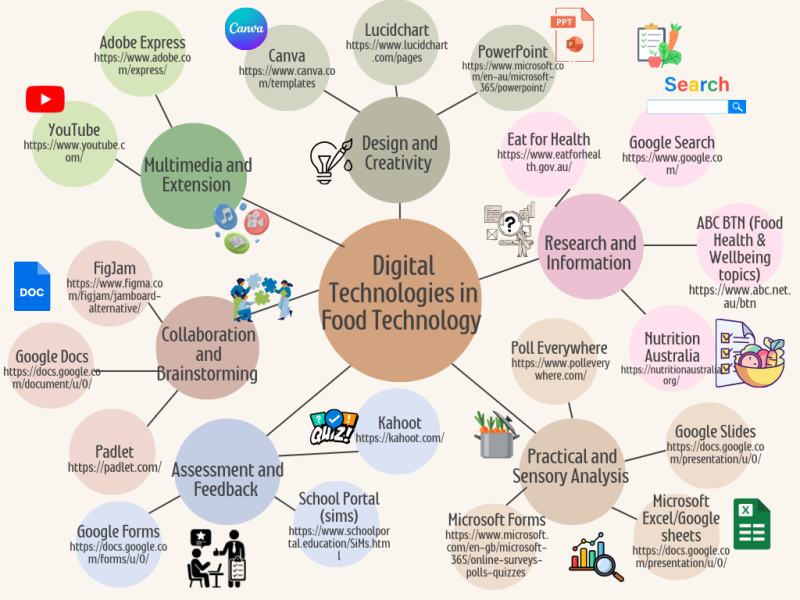
Describe how you approached this task and how you decided on the tools you chose for your concept map:
When approaching the concept map task, I began by identifying the key learning contexts within Food Technology, including theory-based learning, practical and sensory analysis, collaboration, assessment and multimedia presentation. From this starting point, I selected digital tools that aligned with these contexts and reflected the realities of my classroom practice. Rather than choosing technology for its novelty, I prioritised tools that could support purposeful learning, students’ engagement and assessment.
Eady and Lockyer (2013) significantly influenced my decision-making by emphasising that digital tools should be selected based on their ability to support learning objectives and teaching strategies. This encouraged me to choose platforms such as Google Forms, Microsoft Excel and Padlet, which support data collection, reflection and higher order thinking in practical and sensory analysis tasks. Similarly, Ibieta et al (2017) highlight that teachers are more likely to integrate ICT effectively when tools align with existing professional practices and classroom needs. As a result, I included familiar platforms such as the school portal we use (SIMS), Google Docs, and PowerPoint to ensure accessibility and ease of implementation.
Overall, my approach focused on selecting balanced range of tools that support research, collaboration, assessment, and creative expression, while remaining flexible and realistic for use in a senior Food Technology classroom.
References:
Eady, M. J. & Lockyer, L. 2013, 'Tools for learning: technology and teaching strategies', Learning to Teach in the Primary School, Queensland University of Technology, Australia. pp. 71.
Ibieta, A., Hinostroza, J. E., Labbé, C., & Claro, M. (2017). The role of the Internet in teachers’ professional practice: activities and factors associated with teacher use of ICT inside and outside the classroom. Technology, Pedagogy and Education, 26(4), 425-438.
References in the mind map:
Australian Broadcasting Corporation. (n.d.). Behind the News (BTN). https://www.abc.net.au/btn
Australian Government, Department of Health and Aged Care. (n.d.). Eat for health. https://www.eatforhealth.gov.au
Adobe. (n.d.). Adobe Express. https://www.adobe.com/express/
Canva. (n.d.). Canva. https://www.canva.com
FigJam. (n.d.). FigJam. https://www.figma.com/figjam/
Google. (n.d.-a). Google Docs. https://docs.google.com
Google. (n.d.-b). Google Forms. https://forms.google.com
Google. (n.d.-c). Google Search. https://www.google.com
Google. (n.d.-d). Google Slides. https://slides.google.com
Kahoot!. (n.d.). Kahoot!. https://kahoot.com
Lucid Software Inc. (n.d.). Lucidchart. https://www.lucidchart.com
Microsoft. (n.d.-a). Microsoft Excel. https://www.microsoft.com/excel
Microsoft. (n.d.-b). Microsoft Forms. https://www.microsoft.com/microsoft-forms
Microsoft. (n.d.-c). Microsoft PowerPoint. https://www.microsoft.com/powerpoint
Nutrition Australia. (n.d.). Nutrition Australia. https://nutritionaustralia.org
Padlet. (n.d.). Padlet. https://padlet.com
Poll Everywhere. (n.d.). Poll Everywhere. https://www.polleverywhere.com
YouTube. (n.d.). YouTube. https://www.youtube.com
Create Your Own Website With Webador