Weekly Tasks
This page features the weekly tasks I complete for ESC407. Each entry highlights my learning, practical responses, and developing understanding of classroom technologies.
Education Technology - The Big Picture
The Commodore 64 computer ad (early 1980s) promotes the computer as a pathway to higher education by contrasting it with gifts like a bike or stereo, which are shown as fun but not “future-building”. This message is that while other presents offer short-term enjoyment, the Commodore 64 provides long-term educational value by helping children learn computing, study skills, and academic habits. The ad targets parents’ desires to support their child’s success, suggesting that owning a computer will give the, an advantage in an increasingly technological world. Overall, the ad markets the Commodore 64 as an investment in a child’s educational future.
The recent Apple “Lessons” ad showcases computers as modern academic tools. for example, it highlights features like wireless file sharing, writing tools, multitasking and long battery life, all portrayed as practical aids to students’ study pressure, helping with note-taking, assignments, collaboration and productivity.
While both ads focus on the educational value of computers, their approaches reflect the times in which they were made. The Commodore 64 ad is more aspirational and broad, suggesting that simply having a computer at home can give a child a head start in learning and future opportunities. It does not show exactly how the computer helps instead, it appeals to parents’ hopes for their child’s success. In contrast, the Apple, “Lessons” ad is much more concrete and practical, showing specific ways the computer can help students with everyday tasks, like writing, research, and collaboration. The Apple ad also reflects a world where computers and families are integrated into daily life, whereas the Commodore ad presents technology as exciting and new, and how it can shape a child’s future.
References:
Danny Sigelman (2012). Commodore 64 (1983) - Vintage 80's Television Commercials. YouTube https://www.youtube.com/watch?v=W9ZO08GHYZA&t=22s
Apple India (2025). Mac | Lessons | Apple. YouTube. https://www.youtube.com/watch?v=Io1V7eXcPUc&t=35s


Policy, Curriculum, and Educational Technology
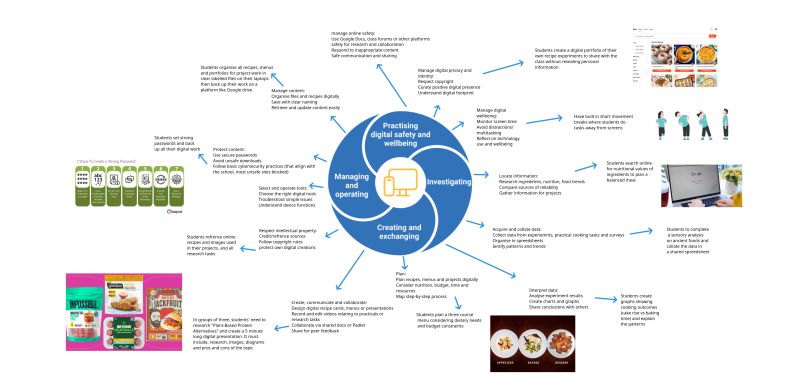
In creating my Explain Everything diagram, I focused on how the Digital Literacy elements from the Australian Curriculum could be applied in a senior secondary Food Technology classroom. I began by reviewing the General Capabilities: Digital Literacy (Australian Curriculum, n.d.) to understand the main elements: Practicing digital safety and wellbeing, Investigating, Creating and exchanging, and Managing and operating as well as their sub elements. This framework helped me identify opportunities for students to engage with technology safely, collaboratively, and creatively in authentic learning tasks.
I then referred to the NSW Food Technology Years 7-10 syllabus (2019) to ensure that the activities were relevant to the subject, such as researching ingredients, planning recipes, collating data, and presenting findings digitally. To support the integration of ICT, I drew on Lim et al. (2013) and Newhouse (2013), who discuss effective technology use in schools and how it can enhance learning outcomes. Additionally, the eSafety Commissioner’s guide (n.d.) helped me incorporate practical strategies for digital wellbeing, including managing screen time and backing up digital work.
Combining these sources allowed me to create concrete, subject-specific, and safe digital activities for students, while also ensuring that the diagram aligns with curriculum goals and promotes collaboration, critical thinking and digital responsibility.
References:
Australian Curriculum, Assessment and Reporting Authority. (n.d.). General capabilities: Digital literacy. https://www.australiancurriculum.edu.au/curriculum-information/understand-this-general-capability/digital-literacy
NSW Education Standards Authority. (2019). Food Technology Years 7–10 syllabus. https://educationstandards.nsw.edu.au/wps/portal/nesa/k-10/learning-areas/tas/food-technology-2019
eSafety Commissioner. (n.d.). Digital wellbeing: A guide for students. https://www.esafety.gov.au/
Lim, C. P., Zhao, Y., Tondeur, J., Chai, C. S., & Tsai, C. C. (2013). Bridging the gap: Technology trends and use of technology in schools. Journal of Educational Technology & Society, 16(2), 59–68.
Newhouse, C. P. (2013). ICT in the Australian curriculum.
Thomson, S. (2015). Policy insights: Australian students in a digital world #3. Australian Council for Educational Research.
Image references:
Calm Classroom. (2022). Try These 4 Mindful Movement Breaks from Calm Classroom. https://blog.calmclassroom.com/mindful-movement-breaks-calm-classroom
DIY. (2025). Cook a 3-course meal. https://www.diy.org/challenges/cook-a-3-course-meal
Keepnet. (2024). How to Create a Strong Password in 7 Easy Steps. https://keepnetlabs.com/blog/7-practical-steps-to-creating-a-strong-password
Muinos, L. (2024). The 11 Best Meat Substitutes and Plant-Based Alternatives. The Spruce Eats. https://www.thespruceeats.com/best-meat-substitutes-plant-based-alternatives-5113018
SideChef. (2025). User Experience Best Practices for Recipe Platforms. https://www.sidechef.com/business/recipe-platform/ux-best-practices-for-recipe-sites
Southern, M. (2020). Google Explains How it Organizes Information in Search. SEJ News https://www.searchenginejournal.com/google-explains-how-it-organizes-information-in-search/389567/
Digital Technology and Learning
This comic shows what technology-enhanced, constructivist classroom could look like, where students are the ones doing most of the talking, thinking and creating. Instead of running the lesson from the front of the room, the teacher takes on a guided role, asking questions that help students think more deeply about the problem they are exploring. This reflects Harasim’s (2017) idea that learning happens best when students build knowledge together rather than just receiving it.
The students in the comic use laptops, tablets and shared online tools to research, create and compare ideas. This matches Bower’s (2017) view that technology should support hands-on, meaningful tasks where learners can experiment and make decisions. Their teamwork and problem-solving also connect with the trends Lim et al. (2013) describe, where technology is used to support collaboration and active learning in schools.
Finally, the way students share and discuss their findings reflects Newhouse’s (2013) point that ICT helps learners stay engaged and work in ways that feel relevant and interactive.
Overall, the comic shows a classroom where technology helps students explore ideas, work together, and take charge of their learning all key features of a constructivist approach.
References:
Bower, M. (2017). Pedagogy and Technology-Enhanced Learning. Chapter 3. Design of Technology-Enhanced Learning. Emerald Publishing.
Harasim, L. (2017). Learning theory and online technologies. Chapter 5. Constructivist learning theory. Routledge.
Lim, C. P., Zhao, Y., Tondeur, J., Chai, C. S., & Tsai, C. C. (2013). Bridging the gap: Technology trends and use of technology in schools. Journal of Educational Technology & Society, 16(2), 59–68.
Newhouse, C. P. (2013). ICT in the Australian curriculum.

Collaboration and Technology
Link to my CANVA Doc: https://www.canva.com/design/DAG6oogzkzU/uhKM8N1pRiyROi3RpoRuYw/edit?utm_content=DAG6oogzkzU&utm_campaign=designshare&utm_medium=link2&utm_source=sharebutton
My collaborative task was developed using key principles from Smith and MacGregor (1992) and Henderson et al (2013), both of whom emphasise that genuine collaboration requires interdependence, shared responsibility, and joint construction of knowledge. Smith and MacGregor argue that collaboration is not simply students working side-by-side, but students engaging with one another’s ideas to build a shared outcome. This guided me to design a task in which each student has a distinct role: researcher, designer, tester and evaluator, to ensure the product cannot be completed without meaningful contribution from all group members.
Hendersen et al (2013) highlights how digital tools create new spaces for participation and enable collaborative dialogue beyond the physical classroom. Their discussion of social and interactive platforms informed my choice to use a Padlet, a tool that supports multimodal communication and allows students to respond to each other’s posts, negotiate decisions, and refine ideas continuously. Because contributions remain visible on a shared board, students can build on each other’s thinking even when working at different times. These ideas helped shape the final task design: a product-development project where technology does more than store work, it actively structures and supports collaborative thinking, decision-making, and co-creation.
References:
Henderson, M., Snyder, I., & Beale, D. (2013). Social media for collaborative learning: A review of school literature. Australian Educational Computing, 28(2).
Smith, B. L., & MacGregor, J. T. (1992). What is collaborative learning? In A. S. Goodsell et al. (Eds.), Collaborative learning: A sourcebook for higher education. National Center on Postsecondary Teaching, Learning, and Assessment.
Create Your Own Website With Webador